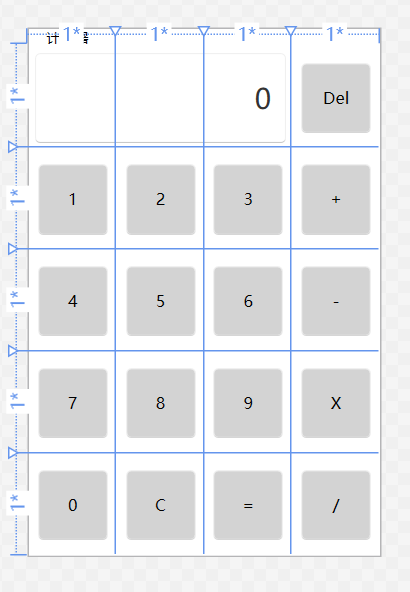


在编写WPF前端代码时,如果需要大量的应用样式到控件上,就需要单独编写样式文件,这样方便进行使用,而不是每次都重写一遍控件的样式。这里采用一个计算器小软件进行演示,其中包含了大量使用统一样式的按钮控件。
一、建立样式文件
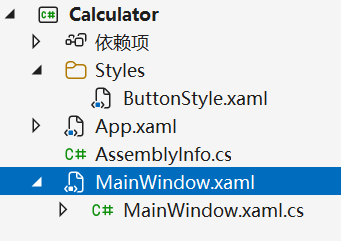
在解决方案中,添加一个Style文件夹,专门用于存放样式。在样式文件夹下放置一个ButtonStyle.xaml的资源词典文件(Resource Dictionary)。
编辑该ButtonStyle.xaml文件,这里采用了WPF-UI的形式进行改写,因此需要引用这一资源:
<ResourceDictionary xmlns="http://schemas.microsoft.com/winfx/2006/xaml/presentation"
                    xmlns:x="http://schemas.microsoft.com/winfx/2006/xaml"
                    xmlns:ui="http://schemas.lepo.co/wpfui/2022/xaml">
    <Style TargetType="ui:Button" BasedOn="{StaticResource {x:Type ui:Button}}">
        <Setter Property="FontFamily" Value="Microsoft Yahei"/>
        <Setter Property="FontSize" Value="50"/>
        <Setter Property="Margin" Value="5"/>
        <Setter Property="Width" Value="60"/>
        <Setter Property="Height" Value="60"/>
        <Setter Property="HorizontalAlignment" Value="Center"/>
        <Setter Property="VerticalAlignment" Value="Center"/>
        <Setter Property="Foreground" Value="Black"/>
        <Setter Property="Background" Value="#FFD3D3D3"/>
    </Style>
</ResourceDictionary>
编辑完毕后,需要在MainWindow.xaml文件中引用该样式:
    <Window.Resources>
        <ResourceDictionary>
            <ResourceDictionary.MergedDictionaries>
                <ResourceDictionary Source="Styles/ButtonStyle.xaml"/>
            </ResourceDictionary.MergedDictionaries>
        </ResourceDictionary>
    </Window.Resources>
这样以后,在MainWindow.xaml文件中写Button的样式,可以写为:
<ui:Button x:Name="Button4" Grid.Row="2" Grid.Column="0" Content="4"/>会自动变为之前设定的样式: