


初学MVVM架构,使用CommunityToolKit.MVVM做一个小软件练手,根据IP进行定位和获取城市天气预报。
一、项目架构
整体布局如图中所示:
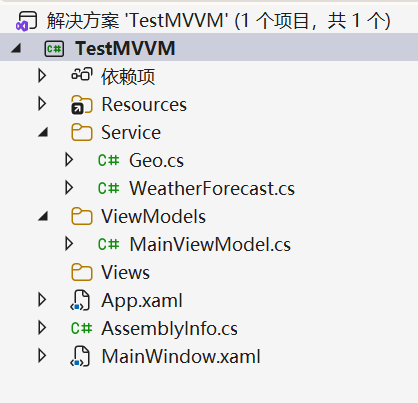
包括了一个简单的MainWindow.xaml窗口,一个绑定的MainViewModel,以及两个Service文件。
二、前端代码
<Window x:Class="TestMVVM.MainWindow"
        xmlns="http://schemas.microsoft.com/winfx/2006/xaml/presentation"
        xmlns:x="http://schemas.microsoft.com/winfx/2006/xaml"
        xmlns:d="http://schemas.microsoft.com/expression/blend/2008"
        xmlns:mc="http://schemas.openxmlformats.org/markup-compatibility/2006"
        xmlns:local="clr-namespace:TestMVVM.ViewModels"
        mc:Ignorable="d"
        WindowStartupLocation="CenterScreen"
        WindowStyle="None"
        AllowsTransparency="True"
        Background="Transparent"
        Title="天气预报" Height="520" Width="900">
    <Window.DataContext>
        <local:MainViewModel/>
    </Window.DataContext>

    <Window.Resources>
        <!-- Gradient background brush -->
        <LinearGradientBrush x:Key="AppGradient" StartPoint="0,0" EndPoint="1,1">
            <GradientStop Color="#20343f" Offset="0"/>
            <GradientStop Color="#1b263b" Offset="0.5"/>
            <GradientStop Color="#14213d" Offset="1"/>
        </LinearGradientBrush>

        <!-- Card style with rounded corners and shadow -->
        <Style x:Key="CardContainer" TargetType="Border">
            <Setter Property="CornerRadius" Value="16"/>
            <Setter Property="Background" Value="#EEFFFFFF"/>
            <Setter Property="Padding" Value="16"/>
            <Setter Property="Effect">
                <Setter.Value>
                    <DropShadowEffect BlurRadius="18" ShadowDepth="0" Opacity="0.35" Color="#000000"/>
                </Setter.Value>
            </Setter>
        </Style>

        <!-- Animated button style -->
        <Style x:Key="AccentButton" TargetType="Button">
            <Setter Property="Foreground" Value="#14213d"/>
            <Setter Property="Background" Value="#FFDCE6"/>
            <Setter Property="BorderBrush" Value="#B3C7"/>
            <Setter Property="BorderThickness" Value="0"/>
            <Setter Property="Padding" Value="10,6"/>
            <Setter Property="FontSize" Value="16"/>
            <Setter Property="Cursor" Value="Hand"/>
            <Setter Property="Template">
                <Setter.Value>
                    <ControlTemplate TargetType="Button">
                        <Border x:Name="bd" CornerRadius="8" Background="{TemplateBinding Background}" SnapsToDevicePixels="True">
                            <ContentPresenter HorizontalAlignment="Center" VerticalAlignment="Center" RecognizesAccessKey="True"/>
                        </Border>
                        <ControlTemplate.Triggers>
                            <Trigger Property="IsMouseOver" Value="True">
                                <Trigger.EnterActions>
                                    <BeginStoryboard>
                                        <Storyboard>
                                            <ColorAnimation Storyboard.TargetName="bd" Storyboard.TargetProperty="(Border.Background).(SolidColorBrush.Color)" To="#C8E3FF" Duration="0:0:0.15"/>
                                        </Storyboard>
                                    </BeginStoryboard>
                                </Trigger.EnterActions>
                                <Trigger.ExitActions>
                                    <BeginStoryboard>
                                        <Storyboard>
                                            <ColorAnimation Storyboard.TargetName="bd" Storyboard.TargetProperty="(Border.Background).(SolidColorBrush.Color)" To="#FFDCE6" Duration="0:0:0.2"/>
                                        </Storyboard>
                                    </BeginStoryboard>
                                </Trigger.ExitActions>
                            </Trigger>
                            <Trigger Property="IsPressed" Value="True">
                                <Setter TargetName="bd" Property="RenderTransform">
                                    <Setter.Value>
                                        <ScaleTransform ScaleX="0.98" ScaleY="0.98"/>
                                    </Setter.Value>
                                </Setter>
                                <Setter TargetName="bd" Property="RenderTransformOrigin" Value="0.5,0.5"/>
                            </Trigger>
                        </ControlTemplate.Triggers>
                    </ControlTemplate>
                </Setter.Value>
            </Setter>
        </Style>

        <!-- Window chrome buttons -->
        <Style x:Key="WindowIconButton" TargetType="Button" BasedOn="{StaticResource AccentButton}">
            <Setter Property="Background" Value="#FFFFFF"/>
            <Setter Property="FontWeight" Value="Bold"/>
            <Setter Property="Width" Value="36"/>
            <Setter Property="Height" Value="28"/>
            <Setter Property="Padding" Value="0"/>
            <Setter Property="FontSize" Value="14"/>
        </Style>
    </Window.Resources>

    <Grid Background="{StaticResource AppGradient}">
        <!-- Drag area for window move -->
        <Grid.RowDefinitions>
            <RowDefinition Height="Auto"/>
            <RowDefinition Height="*"/>
            <RowDefinition Height="Auto"/>
        </Grid.RowDefinitions>

        <!-- Top bar -->
        <Grid Grid.Row="0" Margin="16,16,16,8">
            <Grid.ColumnDefinitions>
                <ColumnDefinition Width="*"/>
                <ColumnDefinition Width="Auto"/>
            </Grid.ColumnDefinitions>
            <TextBlock Text="天气预报" FontSize="22" FontWeight="SemiBold" Foreground="#FFFFFF" VerticalAlignment="Center"/>
            <StackPanel Grid.Column="1" Orientation="Horizontal" HorizontalAlignment="Right" >
                <Button Content="—" Command="{Binding MinimizeWindowCommand}" Style="{StaticResource WindowIconButton}"/>
                <Button Content="□" Command="{Binding ToggleMaximizeCommand}" Style="{StaticResource WindowIconButton}"/>
                <Button Content="✕" Command="{Binding CloseWindowCommand}" Style="{StaticResource WindowIconButton}" Background="#FF5252" Foreground="White"/>
            </StackPanel>
            <Grid.InputBindings>
                <MouseBinding MouseAction="LeftClick" Command="{Binding DragMoveCommand}"/>
            </Grid.InputBindings>
        </Grid>

        <!-- Main card -->
        <Border Grid.Row="1" Margin="16" Style="{StaticResource CardContainer}">
            <Grid>
                <Grid.ColumnDefinitions>
                    <ColumnDefinition Width="3*"/>
                    <ColumnDefinition Width="2*"/>
                </Grid.ColumnDefinitions>

                <StackPanel Grid.Column="0" Orientation="Vertical" >
                    <StackPanel Orientation="Horizontal" >
                        <TextBlock Text="城市:" VerticalAlignment="Center" Margin="2" FontSize="18"/>
                        <TextBlock Text="{Binding CityName}" Width="200" Margin="2" FontSize="18"/>
                        <Button Content="获取当前城市" Command="{Binding FetchLocationCommand}" Style="{StaticResource AccentButton}"/>
                    </StackPanel>
                    <Button Content="获取天气" Command="{Binding FetchWeatherCommand}" Width="120" Style="{StaticResource AccentButton}"/>
                    <StackPanel Orientation="Horizontal">
                        <TextBlock Text="温度:" FontSize="18"/>
                        <TextBlock Text="{Binding Temperature}" FontSize="18"/>
                    </StackPanel>

                    <!-- Subtle fade-in on load -->
                    <StackPanel.Triggers>
                        <EventTrigger RoutedEvent="Loaded">
                            <BeginStoryboard>
                                <Storyboard>
                                    <DoubleAnimation Storyboard.TargetProperty="Opacity" From="0" To="1" Duration="0:0:0.4"/>
                                    <DoubleAnimation Storyboard.TargetProperty="(UIElement.RenderTransform).(TranslateTransform.Y)" From="10" To="0" Duration="0:0:0.3"/>
                                </Storyboard>
                            </BeginStoryboard>
                        </EventTrigger>
                    </StackPanel.Triggers>
                    <StackPanel.RenderTransform>
                        <TranslateTransform Y="0"/>
                    </StackPanel.RenderTransform>
                </StackPanel>

                <!-- Right side decorative / future content -->
                <Grid Grid.Column="1">
                    <Grid.RowDefinitions>
                        <RowDefinition Height="*"/>
                        <RowDefinition Height="Auto"/>
                    </Grid.RowDefinitions>
                    <Ellipse Fill="#88CFE1" HorizontalAlignment="Right" VerticalAlignment="Top" Width="180" Height="180">
                        <Ellipse.Effect>
                            <BlurEffect Radius="12"/>
                        </Ellipse.Effect>
                    </Ellipse>
                    <TextBlock Grid.Row="1" Text="实时天气" HorizontalAlignment="Right" Foreground="#14213d" FontWeight="Bold"/>
                </Grid>
            </Grid>
        </Border>

        <!-- Bottom tips -->
        <TextBlock Grid.Row="2" Margin="16,8" Foreground="#DDE" Text="提示:使用上方按钮获取当前城市和天气信息"/>
    </Grid>
</Window>
三、ViewModel代码
using System.Windows;
using CommunityToolkit.Mvvm.ComponentModel;
using CommunityToolkit.Mvvm.Input;
using TestMVVM.Service;
using System.Threading.Tasks;

namespace TestMVVM.ViewModels
{
    public partial class MainViewModel:ObservableObject
    {
        [RelayCommand]
        private void TestButton()
        {
            MessageBox.Show("Button clicked!");
        }

        [RelayCommand]
        private void CloseWindow()
        {
            Application.Current.Shutdown();
        }

        [RelayCommand]
        private void MinimizeWindow()
        {
            var win = Application.Current?.MainWindow;
            if (win != null)
            {
                win.WindowState = WindowState.Minimized;
            }
        }

        [RelayCommand]
        private void ToggleMaximize()
        {
            var win = Application.Current?.MainWindow;
            if (win != null)
            {
                win.WindowState = win.WindowState == WindowState.Maximized ? WindowState.Normal : WindowState.Maximized;
            }
        }

        [RelayCommand]
        private void DragMove()
        {
            var win = Application.Current?.MainWindow;
            if (win != null)
            {
                try { win.DragMove(); } catch { /* ignore */ }
            }
        }

        [RelayCommand]
        private async void FetchLocation()
        {
            var geo = new Geo();
            var result = await geo.GetGeo();
            CityName = result;
        }

        // Async implementation without command attribute
        private async Task FetchWeatherAsync()
        {
            var weather = new WeatherForecast();
            float temp = await weather.GetWeather(CityName);
            Temperature= $"{temp}℃";
        }

        // Single command exposed to XAML
        [RelayCommand]
        private Task FetchWeather()
        {
            return FetchWeatherAsync();
        }


        [ObservableProperty]
        private string cityName;

        [ObservableProperty]
        private string temperature;
    }
}
四、服务代码
///Geo.cs

using System;
using System.Collections.Generic;
using System.Linq;
using System.Net.Http;
using System.Text;
using System.Text.Json;
using System.Threading.Tasks;
using System.Windows.Media.Animation;

namespace TestMVVM.Service
{
    class Geo
    {
        public async Task<string> GetGeo()
        {
            HttpClient client = new HttpClient();
            string json = await client.GetStringAsync("http://ip-api.com/json/");

            var options = new JsonSerializerOptions
            {
                PropertyNameCaseInsensitive = true
            };

            var result = JsonSerializer.Deserialize<IpLocation>(json, options);

            if (result is null)
            {
                throw new InvalidOperationException("反序列化失败:结果为 null。请检查返回的 JSON 内容:" + json);
            }

            string city = result.City;
            return city;
        }

        public class IpLocation
        {
            public string Country { get; set; }
            public string RegionName { get; set; }
            public string City { get; set; }
            public double Lat { get; set; }
            public double Lon { get; set; }
            public string Isp { get; set; }
        }
    }
}
///WeatherForecast.cs

using System;
using System.Threading.Tasks;
using OpenMeteo;

namespace TestMVVM.Service
{
    class WeatherForecast
    {
        public DateOnly Date { get; set; }
        public int TemperatureC { get; set; }
        public string? Summary { get; set; }
        public int TemperatureF => 32 + (int)(TemperatureC / 0.5556);

        public async Task<float> GetWeather(string city)
        {
            var client = new OpenMeteoClient();

            var forecast = await client.QueryWeatherApiAsync(city).ConfigureAwait(false);

            if (forecast?.Current?.Temperature is float temp)
            {
                return temp;
            }

            throw new InvalidOperationException("无法获取天气温度:API 响应缺失或为 null。");
        }
    }
}